Custom Domains
Notion Custom Domain: Connect Your Own Domain in Minutes
Last updated: August 2026
Add a custom domain to your Notion page and turn it into a real website in seconds. With Matrizen, you can connect a Notion custom domain — your own personal domain or a custom URL like yoursite.com — without coding and publish instantly. This guide covers what a Notion custom domain is, how to set one up (including the exact DNS records), how the pricing compares, common problems and fixes, and answers to the most-asked questions.
Free plan. Custom domain from $5/mo. No credit card.
Why Use a Custom Domain?
Professional URL
Build trust with a recognizable address — no notion.so subdomains.
Improve SEO
Your own domain authority improves search engine rankings over time.
Strengthen Your Brand
Align every page with your brand identity and domain name.
No Third-Party Subdomains
Avoid depending on URLs you don't control.
How to Add a Custom Domain to Your Notion Page
Follow these steps to connect a Notion website custom domain using Matrizen. The whole process takes under five minutes.
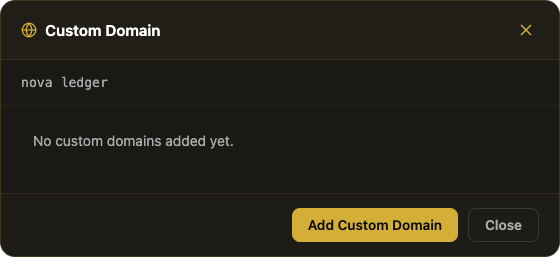
Make your Notion page public
Open your Notion page, click Share in the top right, then set General access to Anyone with the link. This makes the content readable by Matrizen without credentials.
Create a site on Matrizen
Paste your Notion page URL into Matrizen's dashboard, give your site a name and choose a theme. Click Deploy — your site is immediately live on a free *.matrizen.app subdomain while you configure your domain.
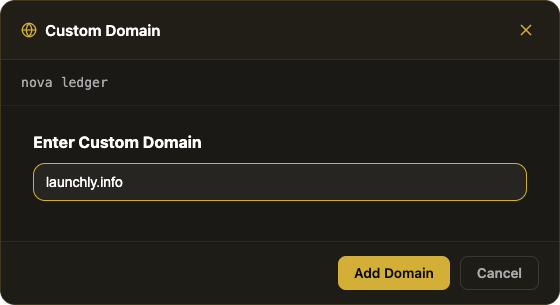
Enter your custom domain
In the site settings, open Custom Domain, click Add Custom Domain, type your domain (e.g. yoursite.com or blog.yoursite.com), and click Add Domain. Matrizen will display the exact DNS records you need to add.
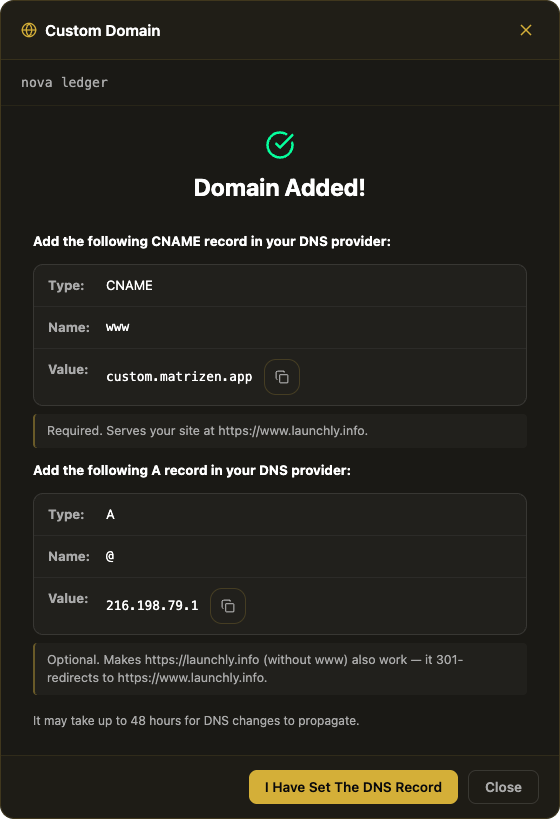
Add the DNS records at your DNS provider
This is the most important step. Log in to your domain registrar (Namecheap, GoDaddy, Cloudflare, etc.), go to DNS settings and add the records Matrizen shows you. A subdomain (www or blog.yoursite.com) just needs a CNAME; a root domain (yoursite.com) needs that same CNAME on www plus an optional A record on the bare domain so yoursite.com redirects to www too. Copy the exact values from your Matrizen dashboard — the steps are usually under DNS → Add Record.
Need the exact clicks for your registrar? Follow our full guide on how to point a domain to your Notion site (GoDaddy, Namecheap, Cloudflare, and more).
Wait for DNS propagation
DNS changes usually take 1–10 minutes. Matrizen automatically verifies your domain and provisions a free HTTPS certificate once the records are detected. You'll see a green "Verified" status in your dashboard.
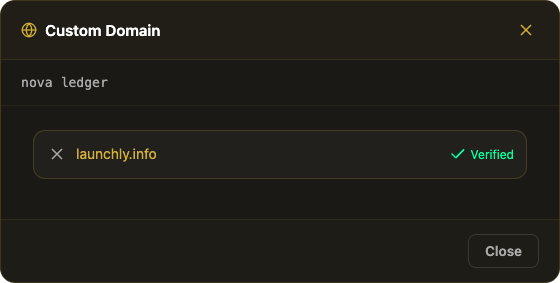
Your Notion site is live on your domain
Visit your domain — your Notion page is now served as a fast, SEO-friendly static website with HTTPS. Any time you update your Notion page, Matrizen auto-syncs within the hour.
Start with a free site — no credit card needed
Deploy your first Notion site for free on a *.matrizen.app subdomain, then add your own domain when you're ready.
Create your free site →Use Your Own Domain with a Notion Site — Not a notion.site URL
Notion's default sharing links (those long notion.site URLs) aren't built for SEO or branding. Connecting your own domain to a Notion site with Matrizen gives you a clean, branded address and full control over how your pages appear in search engines.
Notion Custom Domain Pricing: Matrizen vs Competitors
Not all Notion custom domain solutions are priced the same. Here is how Matrizen compares for the most common use cases.
| Plan | Matrizen | Super.so | Notion native |
|---|---|---|---|
| 1 site — custom domain | $5/mo | $16/mo | $10/mo add-on + paid Notion plan |
| 5 sites — custom domain | $19/mo | $80/mo | $90/mo+ |
| 30 sites — custom domain | $99/mo | $480/mo | N/A |
| Built-in analytics | built-in (paid plans) | Paid plans only | third-party only |
| Forms built-in | |||
| Webhooks on deploy | |||
| Free subdomain tier |
Every paid plan comes with a 14-day money-back guarantee and can be cancelled anytime. Matrizen only reads your Notion page — it never changes your content.
Connect Your Domain in Minutes
Matrizen makes it simple to connect your domain and publish your site. Your Notion content is converted into a fast static website and deployed on your domain instantly.
- No code required
- Works with any domain provider
- Fast global delivery
- SEO-friendly static HTML
Use Cases
- Personal websites
- Startup landing pages
- Documentation sites
- Portfolios
Notion Custom Domain Troubleshooting
Most custom domain issues come down to DNS. Here are quick fixes for the problems people hit most often.
- Domain stuck on "not verified"? DNS changes can take up to 48 hours. Check propagation with a tool like whatsmydns.net and confirm the A/CNAME values match what your Matrizen dashboard shows exactly.
- Using Cloudflare? Set the DNS record to DNS only (grey cloud) for the most reliable setup.
- Only added the root A record, skipped www? The www CNAME is required — the root A record is optional and only redirects to www, so without the CNAME your site won't load on either address.
- Domain already connected elsewhere? Remove the old A/CNAME records (or release the domain from its previous host) before adding it to Matrizen.
- HTTPS not active yet? Matrizen provisions the TLS certificate automatically a few minutes after your DNS verifies — no manual setup needed.
Frequently Asked Questions
Does Notion support custom domains natively?
No. Notion does not allow you to map your own domain directly to a Notion page. You need a third-party tool like Matrizen to host your Notion content on a custom domain.
How much does a Notion custom domain cost?
With Matrizen, a custom domain starts at $5/mo on the Starter plan. Notion's own domain add-on costs $10/mo but requires a paid Notion plan on top. Super.so charges $16/mo per site for a custom domain.
How do I add a custom domain to a Notion page?
With Matrizen: paste your Notion page URL, give your site a name, then go to Your Site → Custom Domain and enter your domain. You'll be shown the exact DNS records to add at your DNS provider — a CNAME record for subdomains, or a CNAME (for www) plus an optional A record (for the bare domain) for root domains. Propagation usually takes 1–10 minutes.
Which DNS record do I need to add for a Notion custom domain?
For a subdomain (e.g. blog.yoursite.com), just one CNAME record. For a root domain (yoursite.com), a CNAME record pointing www at Matrizen (required) plus an optional A record on the bare domain so yoursite.com also works and redirects to www. Matrizen shows the exact records and values to copy in your dashboard under Your Site → Custom Domain.
Do I need Cloudflare or any code to add a custom domain to Notion?
No. Some tutorials show how to host Notion on a custom domain using Cloudflare Workers and manual configuration. With Matrizen you skip all of that — add the DNS record shown in your dashboard and Matrizen handles hosting, HTTPS, and routing for you. No Cloudflare Workers, no code.
Can I change my Notion site's default domain to my own?
Yes. Instead of the default notion.site URL, Matrizen serves your page on your own personal domain or a custom URL like yoursite.com. Visitors never see a notion.site address.
Will my Notion website custom domain be HTTPS?
Yes. Matrizen provisions a free TLS certificate automatically as soon as your DNS records propagate. No manual certificate setup required.
Can I use a subdomain like blog.mydomain.com?
Yes. You can point any subdomain (e.g. blog.mydomain.com, docs.mydomain.com) to a Matrizen site. Each Matrizen plan supports a set number of sites each with their own domain.
How long does it take for the custom domain to go live?
Most domains go live within 1–10 minutes after you add the DNS records. In rare cases DNS propagation can take up to 48 hours depending on your DNS provider.
Can I use Matrizen with any domain registrar?
Yes. Matrizen works with every domain registrar: Namecheap, GoDaddy, Cloudflare, Google Domains, Porkbun, and any other provider that lets you edit DNS records.
Can I use a custom domain with a Notion site in another language?
Yes. Language and custom domains are independent. Set your site's language for free — 14 languages including Spanish, French, German, Portuguese, Italian, Japanese, and Chinese — from the Language button on your site card, then point your custom domain at it as usual. Your navigation, dates, and SEO tags (the HTML lang attribute and og:locale) render in the chosen language on your own domain.
Ready to connect your Notion custom domain?
Get your Notion page live on your own domain in minutes — no code required, free plan available. Paid plans include a 14-day money-back guarantee.
Start for free →